The Crocoblock team has entered the page-builder market. The public beta of CrocoBuilder is presented as common ground for visual web designers, developers and AI-assisted workflows. It offers a shared front-end system that an AI agent, a visual designer and a developer can all edit without creating discrepancies.
I think the idea is a good one, and the beta already shows promise. I used CrocoBuilder to build a demo site for a fictional estate agency. It used native builder elements, reusable components, global styles, a real WordPress menu, JetEngine content, query loops, Theme Builder templates and responsive layouts. Most of it worked well.
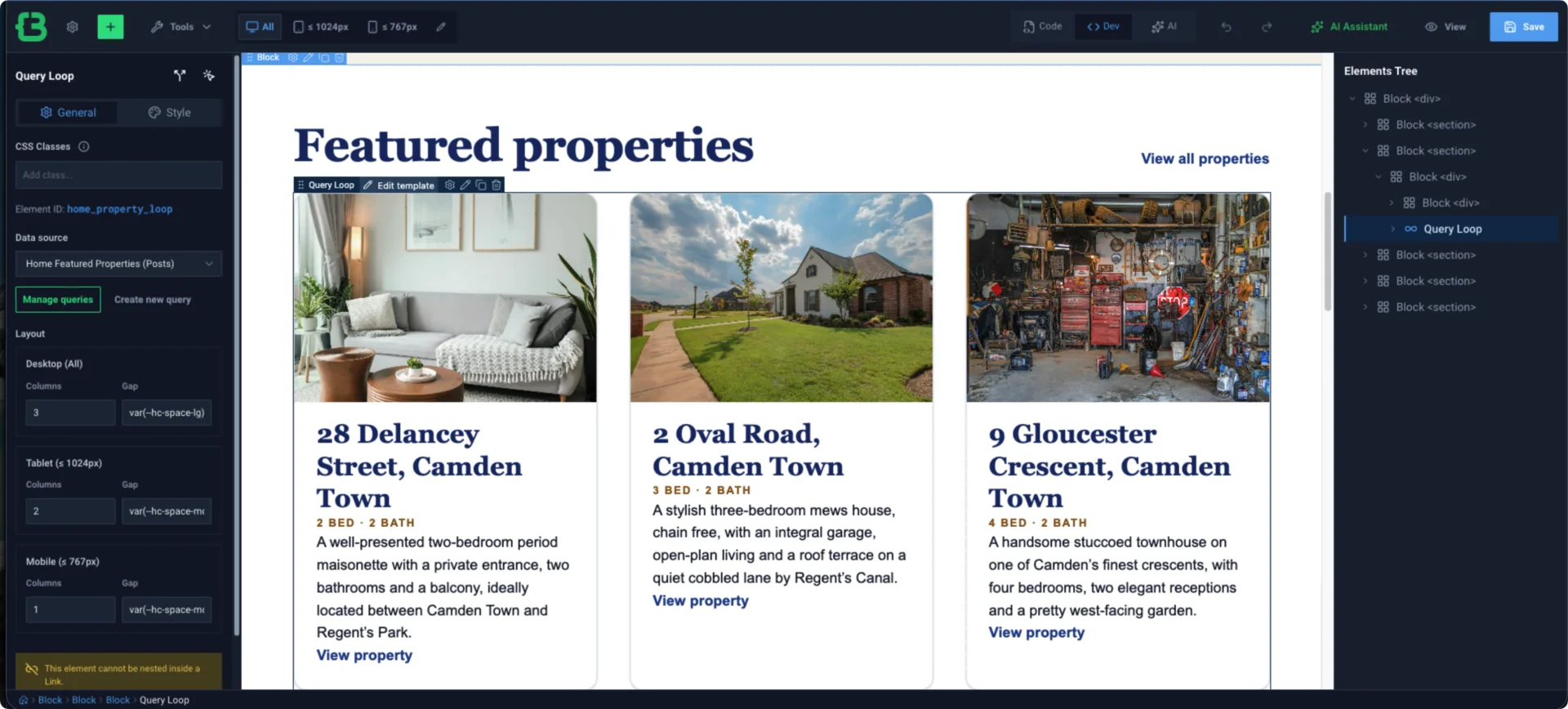
The concern is that the three promised ways of working are not yet equally mature. The AI/MCP route is clearly the star of the show. MCP, or Model Context Protocol, is the connection that lets an external AI agent work with CrocoBuilder. The visual and code-first routes need substantial improvement before they can inspire the same confidence.
This is a review of a beta product, not a final verdict, so the point here is to identify the foundation worth keeping and the gaps that matter before the stable 1.0 release.
TL;DR
CrocoBuilder has a strong architectural core. Its native builder elements, design system, dynamic data integration, reusable components and AI-agent contract are all promising. It produced a maintainable, responsive WordPress site rather than generic AI-generated output. However, my testing also found the following:
- Confirmed product issues: 21 across CrocoBuilder and the CrocoBuilder Blank theme, including four P1 core-workflow defects, eleven P2 important defects and six P3 usability or validation defects.
- Contract and documentation: two further P2 defects.
- Not counted against Crocoblock: two integration findings that belonged to Novamira rather than CrocoBuilder.
The biggest concern is not the number of bugs. It is the pattern behind several of them: the interface or API reports success, while the saved data, generated CSS, public page or selected deployment target tells a different story.
That kind of trust gap deserves priority.
On this page
- A thank-you to content creators showing early demos
- What CrocoBuilder is promising
- How I tested it
- What CrocoBuilder already does well
- Where the experience breaks down
- CrocoBuilder Blank needs a clearer semantic contract
- The complete findings snapshot
- Practical workarounds used during testing
- What I would improve before calling the experience production-ready
- Who should try CrocoBuilder now?
- A positive conclusion
A thank-you to content creators showing early demos
Before I get into the testing, I want to thank Abdul Musqit (also known as Moxet Khan) for sharing his CrocoBuilder demo site and publishing “CrocoBuilder | Build WordPress Website with MCP & AI Prompts” on YouTube.
Thanks as well to the other creators taking the time to introduce a new cool product.
Those walkthroughs are useful, but most coverage so far naturally focuses on the most eye-catching workflow: give an AI agent a prompt and watch it build inside WordPress.
That is a fair demonstration of CrocoBuilder’s main selling point. However, it does not yet show the whole product.
After the AI-generated first draft, people still need to adjust and maintain the site:
- A designer will add and arrange elements on the canvas.
- A content editor will make content and small visual changes.
- A developer will inspect CSS classes, write CSS, modify markup and use version control to protect the live site.
- A keyboard-only user should be able to operate the editor.
A builder proves itself during the handover from “AI built this” to “a person now owns and maintains this”. That handover is currently CrocoBuilder’s biggest opportunity for improvement.
What CrocoBuilder is promising
Crocoblock describes CrocoBuilder as a developer-grade, AI-native front-end builder for complex WordPress projects. Its product page and official overview centre the product around several connected ideas:
- Atomic DOM output, where each builder element creates one predictable HTML element on the public page.
- A visual editor for layouts, responsive design and dynamic content.
- A unified design system based on real CSS classes, variables, common styles, breakpoints and states.
- Reusable components with editable properties, slots and HTML, CSS and JavaScript control.
- Query loops and a Query Builder for WordPress and JetEngine-powered data.
- Theme Builder templates and conditions for headers, footers, archives and individual posts.
- AI assistance inside the editor, plus MCP access for external agents such as Codex and Claude.
- Manual access to the underlying code, with visual and code-oriented workflows intended to stay in sync.
- GitHub-backed versioning. This is present in the tested beta, while the public product page still labels it “coming soon.”
The ambition is larger than “build a landing page from a prompt”. Crocoblock’s own language is about AI speed without giving up code quality, manual control or long-term maintainability. That is why it is reasonable to assess the AI, visual and code workflows together.
How I tested it
I did not test CrocoBuilder using a single hero section or a polished demo supplied by the vendor. I built a small, fictional estate-agency site called Croco Estates and treated every build step as a test.
The test environment was:
| Item | Tested version |
|---|---|
| WordPress | 7.0.3 |
| PHP | 8.4.23 |
| CrocoBuilder | 1.0.0-beta.20 |
| Parent theme | CrocoBuilder Blank 1.0.0 |
| Dynamic data | JetEngine 3.8.13.2 |
| Filters present | JetSmartFilters 3.8.4 |
Across 20 recorded testing sessions, I tested connection and permissions, design variables and classes, page documents, partial edits, reusable components, menus, dynamic queries, Theme Builder templates and conditions, responsive behaviour, accessibility, the visual element palette, code-first markup, modern CSS and GitHub versioning.
The content model was realistic enough to expose normal builder pressures: 48 properties, eight agents, taxonomies, custom fields, images, archive pages and individual property pages. After each change, I checked both the saved data and the public page instead of assuming that a successful save meant a successful result.
This review is therefore a snapshot of beta.20 in one controlled WordPress setup. It is not a benchmark of every advertised integration, and it should be retested after later releases.
What CrocoBuilder already does well
1. The AI/MCP architecture is more than a gimmick
The MCP connection was the strongest part of the experience. It exposes the actions an AI agent needs, so the agent can create native builder structures instead of pasting an opaque block of generated HTML into WordPress.
Using that route, I created pages, templates, queries, menu data, components, design variables and classes. Unsafe or invalid operations were often rejected with useful errors. The live contract also detected when registering a component changed the available element definitions, without claiming that unrelated capabilities had changed.
This is the right direction for agent-assisted site building: give the agent a proper contract, not a loose collection of prompt tricks.
2. A substantial native site can be built
The successful output was not trivial. Home, About and Contact pages rendered with a shared header and footer, a real WordPress navigation menu, reusable calls to action and responsive layouts. The Home page displayed live Property and Agent records through saved queries and dynamic tokens.
Nine changed builder documents passed structural validation. The main public pages worked at desktop, tablet and mobile sizes without spilling horizontally beyond the viewport, and the tested pages produced no browser console errors.
3. Components have real value
Reusable Valuation CTA and Principle Card components worked across documents. Updating the CTA applied the correction everywhere while preserving edits made to individual copies. That is the sort of behaviour agencies need: a client can change the words without quietly detaching the component from the system that maintains it.
There are still inconsistencies in contracts and validation around component properties, but the underlying reuse model is sound and worth developing further.
4. The design-system direction is good
CrocoBuilder’s classes, variables, states and responsive maps encourage a healthier workflow than styling every element independently. Existing classes could be found and assigned visually. New classes could be created, edited globally and given mobile overrides. Those changes persisted and rendered.
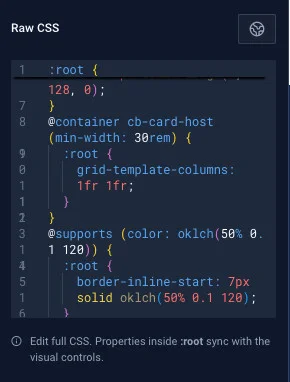
Modern CSS support was better than I expected in several areas. Logical properties, min(), clamp(), container query units, color-mix(), oklch(), balanced text wrapping, individual transforms, custom properties, @media, @supports, @container, @layer and @starting-style all survived the tested round trip.
Container queries also behaved correctly on the public page, including at a narrow mobile host with no horizontal overflow.
5. The visual element coverage is broad
All 32 element cards exposed in the Dev palette could be inserted with a pointer when a valid container was selected. The live registry contained a 33rd internal collection-item type, which was correctly created by Query Loop and could also be represented through the code workflow.
The palette included basic layout/content elements, WordPress elements, collections, saved components and the installed JetSmartFilters elements. The breadth is there. The next job is to make that breadth equally usable and understandable across input methods.
6. Parts of GitHub versioning worked well once connected
After a clean connection, the database-first workflow showed real promise. A one-variable change dirtied only globals/variables.json; a custom commit title and body reached GitHub; cleanup produced another scoped commit; pulls with no changes behaved sensibly; and dirty workspaces disabled operations that should not proceed casually.
That is a useful foundation for bringing reviewable front-end changes into an agency workflow. The severe versioning findings are about connection, transaction safety and routing — not an absence of working version-control ideas.
Where the experience breaks down
1. Theme Builder conditions saved, but key custom post type templates did not appear
This was the clearest builder-level blocker.
Valid archive and individual templates for Properties and Agents were created, published, assigned to the correct conditions, validated and read back correctly. On the public pages, none of those four body templates appeared. WordPress fell back to the Blank theme’s native archive and single output.
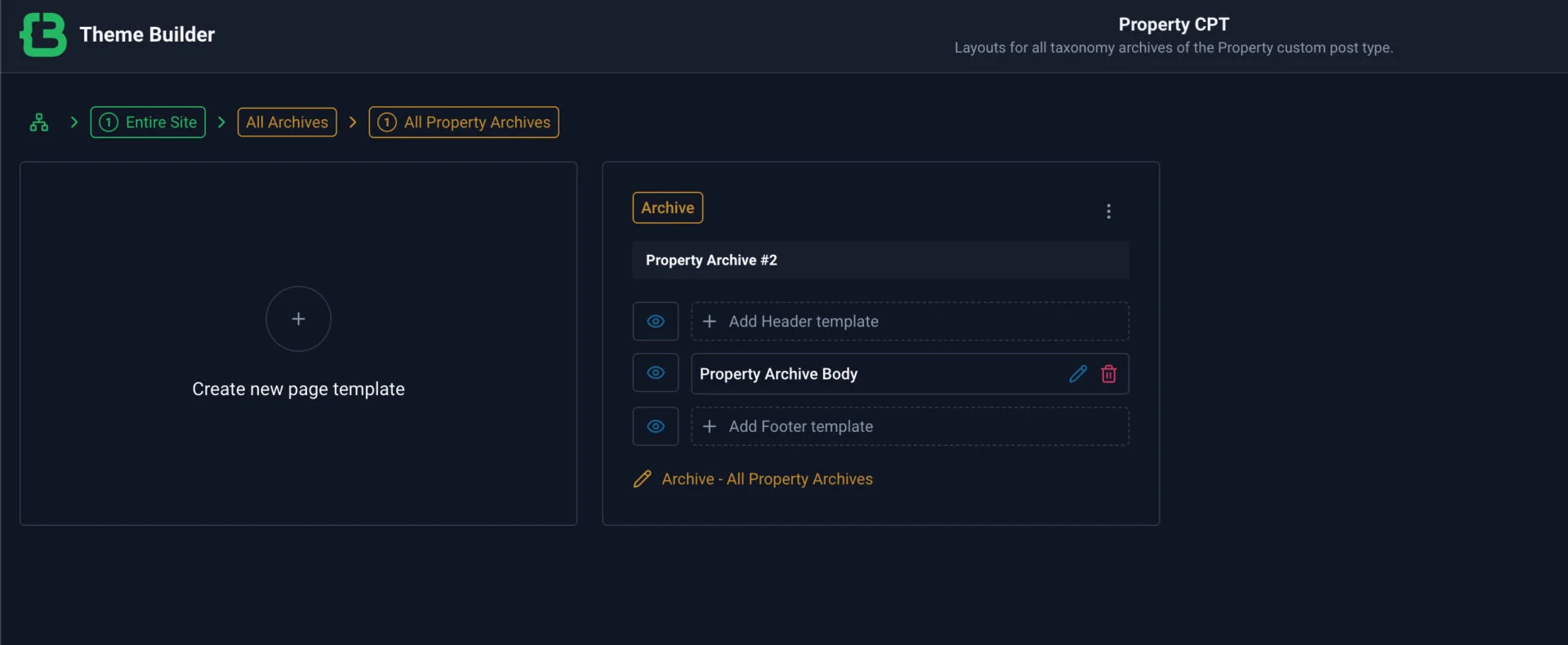
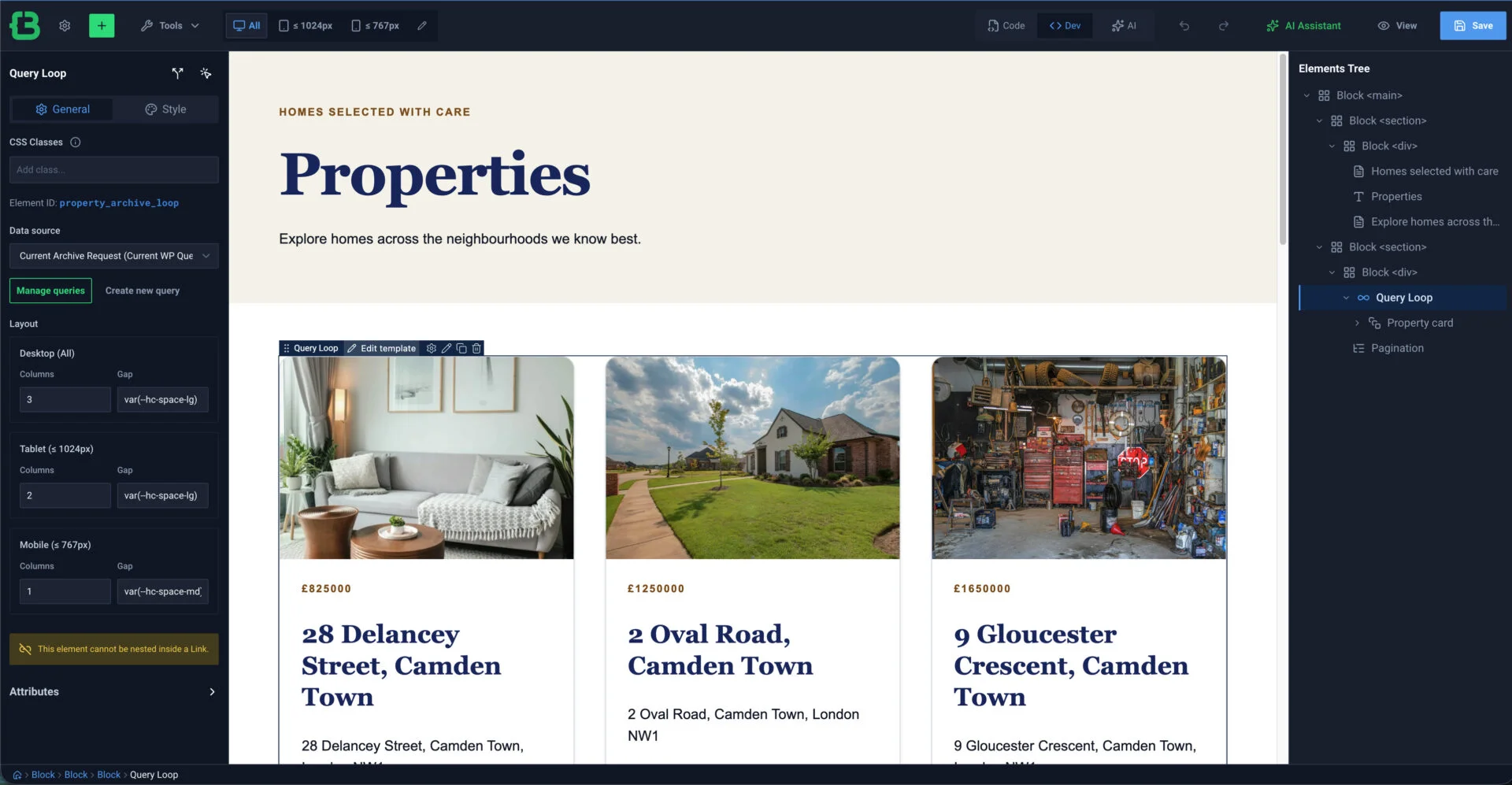
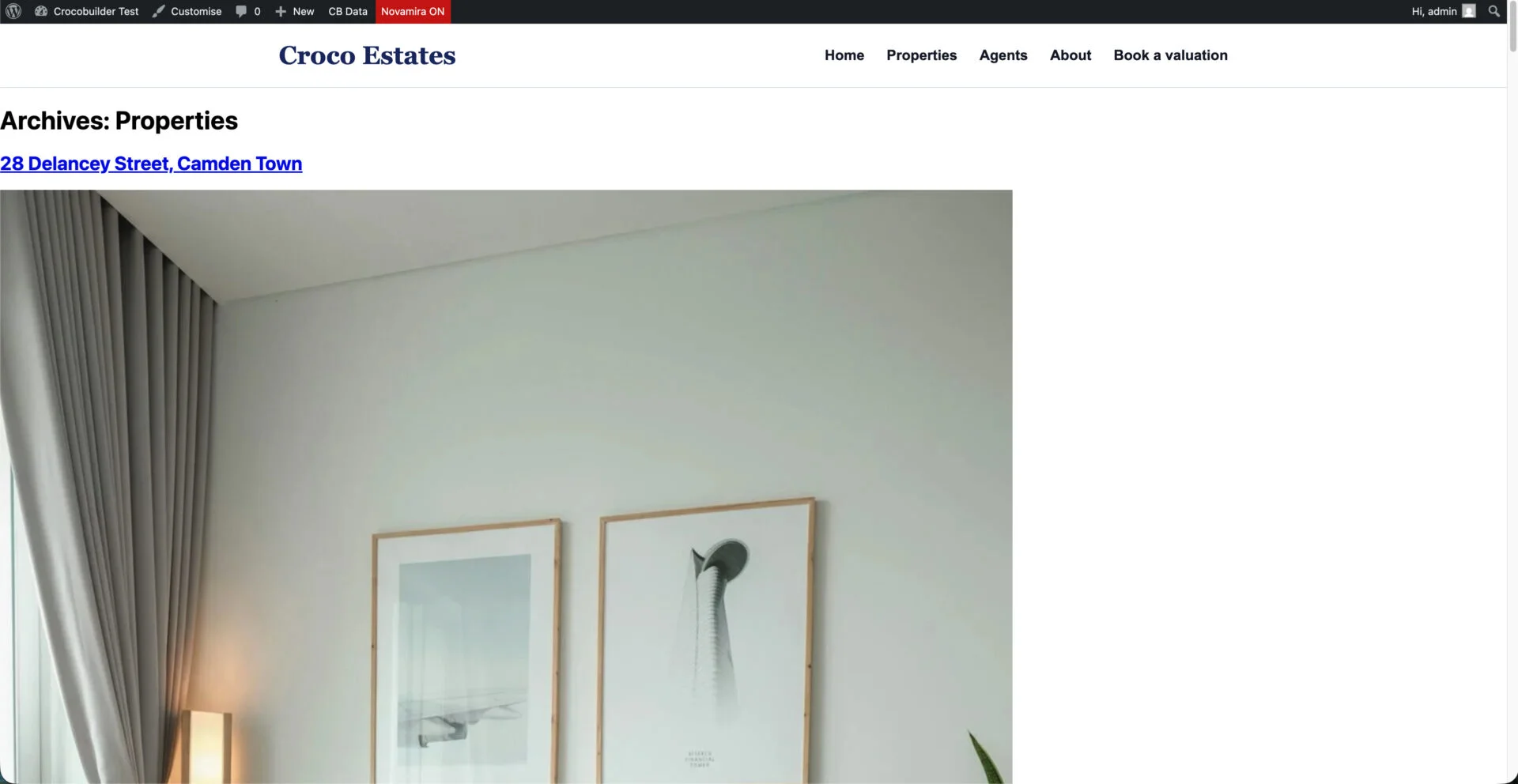
In human terms: the control panel said the templates were assigned, but visitors did not get those templates.
Header and footer inheritance worked, so Theme Builder was not completely broken. The failure was specific to the custom post type (CPT) body templates tested here. It is still P1 because reusable archive and individual templates are a core workflow for the dynamic sites CrocoBuilder is designed to serve.
2. The drag-and-drop editor needs more than visual polish
The visual palette works with a pointer, but every exposed element card was implemented as a draggable div without a usable interactive role, keyboard focus or keyboard activation. A keyboard-only user could not add any of the 32 visible elements.
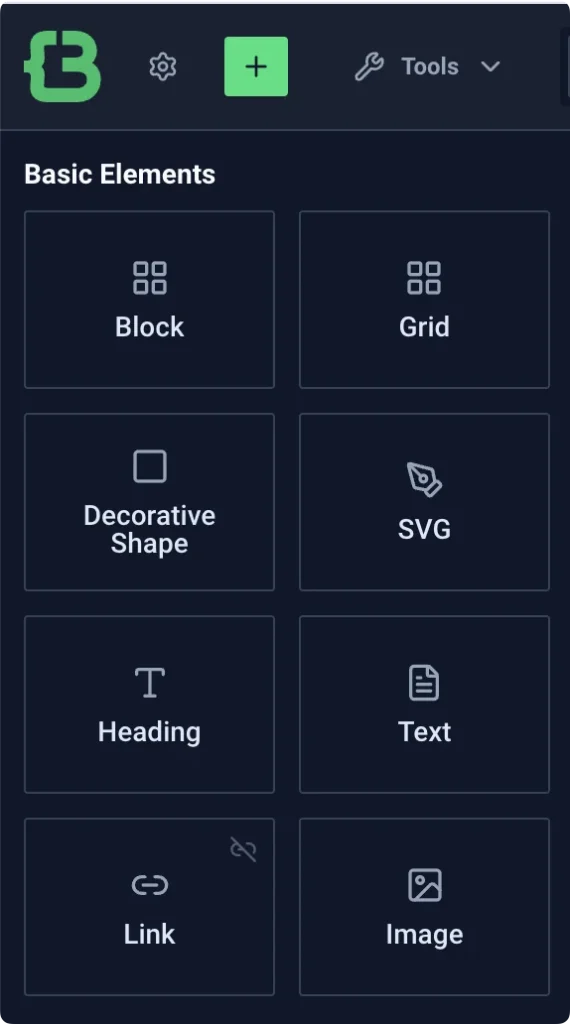
This is a core accessibility failure: adding an element is one of the main operations in a page builder.
Editing a global class requires using the class pill’s Edit action; otherwise the nearby Style and Raw CSS controls edit only the selected element. The UI technically supports both operations, but the difference is too easy to miss.
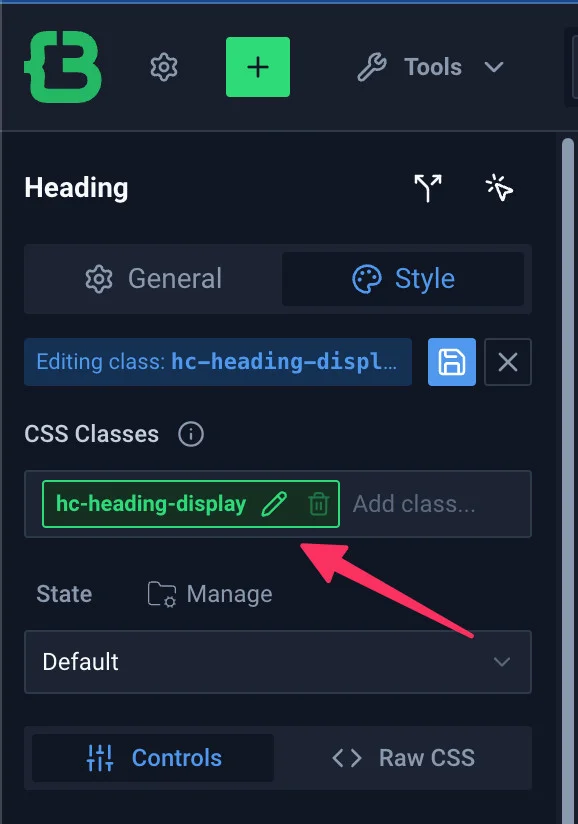
The admin options page also had incomplete keyboard controls, current-state information, labels and landmarks, and its layout did not reflow reliably on a 320-pixel-wide screen. I built a local compatibility plugin to prove that these issues were fixable, but a local patch is not an upstream solution.
The visual workflow does not need to copy another builder. It does need complete keyboard behaviour, clearer state and better feedback when an operation cannot work.
3. Code-first is useful, but not yet dependable
CrocoBuilder’s Code tab is not a free-form HTML editor. It shows an HTML-like version of registered builder elements. Each element needs CrocoBuilder type and identity data, only a defined set of tags is supported, and the builder’s structural rules still apply.
That is a reasonable product decision. A visual builder cannot safely round-trip every possible HTML document.
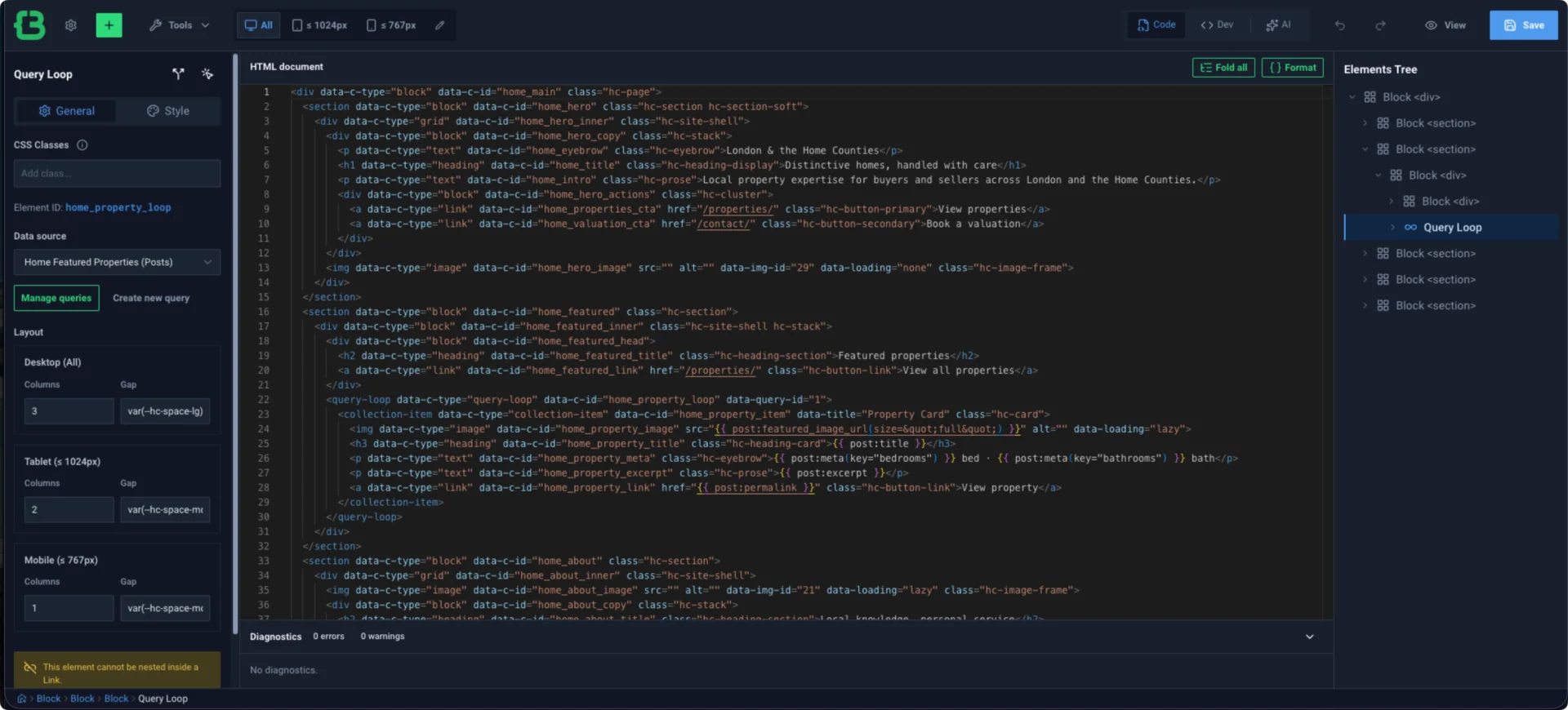
The problem is that the boundary is not always communicated honestly. The editor correctly rejected scripts, inline event handlers, unsafe URLs, srcdoc and inline style attributes. It also correctly preserved useful attributes such as IDs, classes, ARIA attributes, data attributes, roles, and tabindex.
But hidden and inert were accepted with no warning, remained visible in the editor after Save, disappeared from the saved document and vanished only after reopening the Code tab. That is silent data loss affecting visibility and interaction semantics.
When invalid code blocked a switch back to Dev mode, the Dev option could still appear selected while the Code editor remained on screen. Save also remained enabled even though selecting it could only produce an error notice. These are smaller state defects, but they make an already technical workflow harder to trust.
Code-first can become a strong feature if Crocoblock clearly documents the supported format, validates it before saving and immediately shows the actual saved source after every change.
4. “Real CSS” must survive saving and reopening unchanged
The design-system concept is one of CrocoBuilder’s best ideas, which makes the CSS failures especially important.
Several modern CSS features worked, but valid CSS nesting was silently moved onto the root class. That changes the selector’s meaning and can style the wrong element.
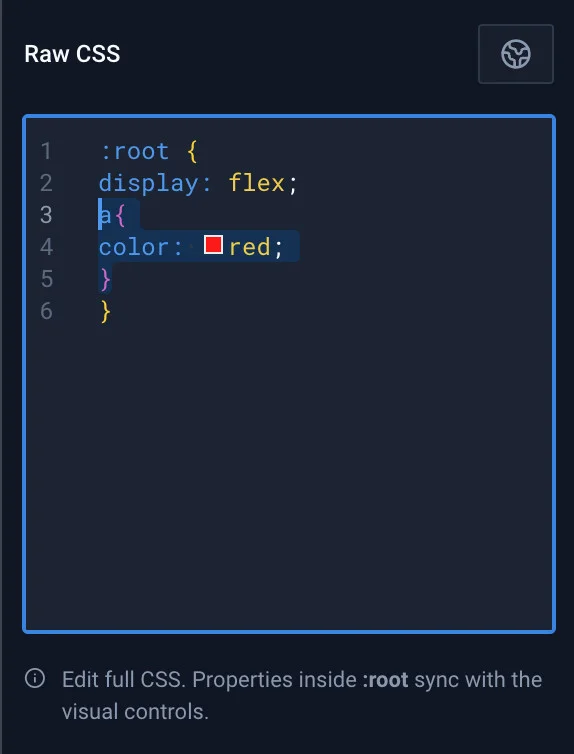
a selector is nested inside :root.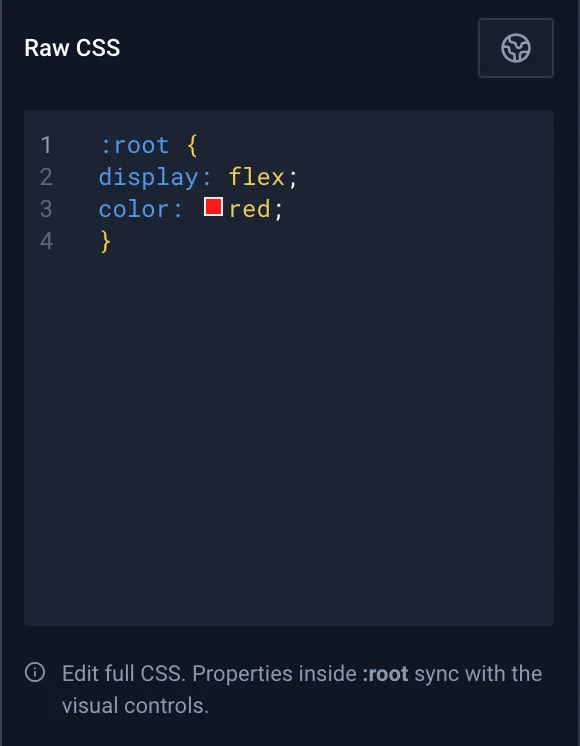
:root.@keyframes saved as an empty rule. The syntax descriptor in @property was corrupted and the browser dropped the result. The editor warned about none of this.
Custom-state validation also rejected valid selectors including :focus-within, :has(), class, attribute and child-combinator patterns, while returning messages that did not explain the supported subset.
The built-in focusVisible state was available, but global class changes reported success while discarding it. Variables intended for text values, such as font stacks or shadows, were normalised to the color type, even though their values still rendered.
There are two acceptable directions for a beta CSS editor: preserve valid CSS exactly, or explicitly reject unsupported syntax before saving. Silently rewriting it is the dangerous middle ground.
5. “Atomic DOM” is cleaner inside page content than around whole templates
CrocoBuilder’s product page says that one builder element produces one DOM node—the page structure a browser renders—with no hidden wrappers or generated markup overhead. The first part held up in my inspection: a Heading, Text, Link or Block remained one authored element in the public page structure.
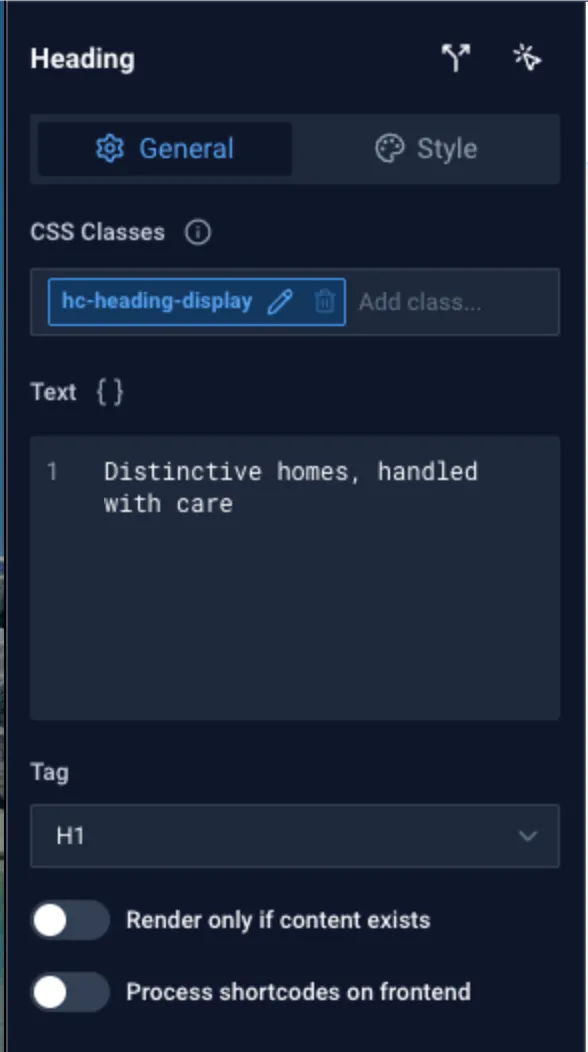
That element was not metadata-free, however. A typical heading included:
<h1
  class="cb-el cb-el-heading cb-home_title hc-heading-display"
  data-id="home_title"
  data-type="heading"
>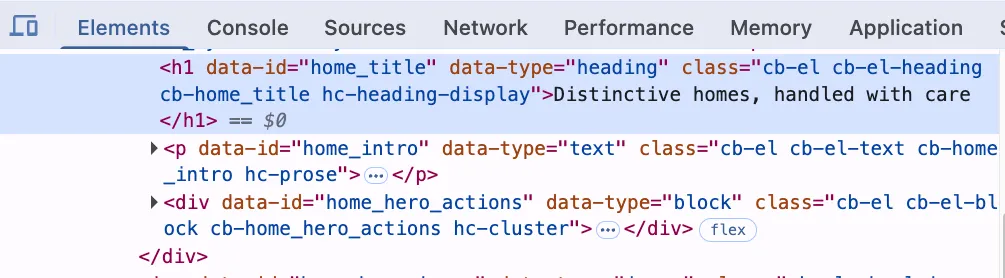
Those tokens are not all doing the same job. The authored hc-heading-display class provides reusable design-system styling. The generated cb-home_title class gives local compiled styles a stable target. data-id identifies the saved node and was also used by Query Loop layout CSS. Native widgets add their own functional hooks, such as the navigation’s breakpoint and menu data.
Other output was harder to justify on the static frontend. On the tested Home page, 88 rendered builder-element instances represented 61 distinct saved nodes.
Only 30 of the 61 node-specific classes had a matching loaded CSS selector, while only two node IDs were referenced through data-id selectors. No loaded CSS selector used data-type or the per-type cb-el-heading-style classes. They may still support the editor, interactive behaviour, browser-side initialisation or debugging, but the public rendering contract does not explain that dependency.
The repeated node identity, type data and generic or node-specific class names added about 7.4 KB of uncompressed markup to this page. Repeated text compresses well during transfer, so this does not prove a meaningful speed penalty.
It is enough to say that “no generated markup overhead” is stronger than the output supports. A more accurate claim would be one authored element, one DOM node, plus builder metadata where required.
Theme Builder adds another layer. My authored Header had one neutral root Block, but the renderer produced:
header#crocoblocks-theme-builder-header
└── div.crocoblocks-theme-builder-location__inner
    └── div.crocoblocks-document
        └── div.cb-site_header
The semantic outer Header is necessary. The .crocoblocks-document wrapper also has an observable job: it carries the source/document IDs and scopes CrocoBuilder’s generic CSS. The additional crocoblocks-theme-builder-location__inner wrapper had no matching loaded CSS rule and no distinct box geometry on the tested page. It may exist for editor or future renderer hooks, but its public purpose is unclear. Removing it, using display: contents where safe, or documenting why it exists would better align Theme Builder with the Atomic DOM promise.
Generated CSS placement deserves the same scrutiny. Global design-system and component styles from the editor loaded in the document head. However, the Theme Builder emitted Header, Page and Footer stylesheets beside their content in the document body. The Header even emitted an empty stylesheet with no rules.
A <link rel="stylesheet"> in the body is allowed by the HTML standard, so this is not invalid markup. It does mean the browser cannot discover that stylesheet until parsing reaches the document.
On a first visit over a slow connection, this could cause a brief flash of unstyled content or movement while the page loads. I did not run a simulated slow-network performance test, so I have not counted it as a confirmed performance bug.
Could those files move to the head? Yes. CrocoBuilder already has to resolve the applicable Header, Body, Footer, concrete page document and components for the request.
CrocoBuilder could collect these assets earlier and enqueue the matched generated files through WordPress’s standard wp_enqueue_style() flow before the head is sent. At minimum, zero-rule files should not be output at all.
These are architectural and optimisation findings, not additions to the confirmed bug count. The sensible next test is a slow-network comparison with an empty cache: current body-loaded styles versus an experimental version that loads them in the document head.
6. Accessibility needs to be a product baseline
The findings were spread across the editor, generated navigation and the public page shell:
- The Dev palette was unavailable from the keyboard.
- Closing the native mobile menu left focus on the now off-screen Close button instead of returning it to the opener.
- The public output provided no native skip link or dependable
#contenttarget. - Global
:focus-visibleclass styling was discarded. - The mobile overlay duplicated its visibility state with both
hiddenandaria-hidden. - Header and Footer examples encouraged nested semantic landmarks that validation accepted as clean.
I created local, test-only fixes for the site, including a skip link, a stable content target, clearer admin focus and mobile navigation fixes. They proved that the problems are tractable. They also showed why accessibility should be fixed in the product rather than left for each site owner to rediscover.
7. The same semantic pattern appears in public AI-workflow demos
This was not limited to my test build. I also used browser developer tools to perform a small, read-only structure check of two public demo sites created through early CrocoBuilder AI workflows.
The Meridian Halls landing page, shown in official Crocoblock coverage, contained one <header> landmark nested inside another, plus the same duplicated <footer> pattern. It did have one <main>, but that landmark had no #content ID and the page offered no skip link.
Abdul Musqit’s demo site showed the same nested Header and Footer template pattern. It also had no <main> landmark, no #content target and no skip link.
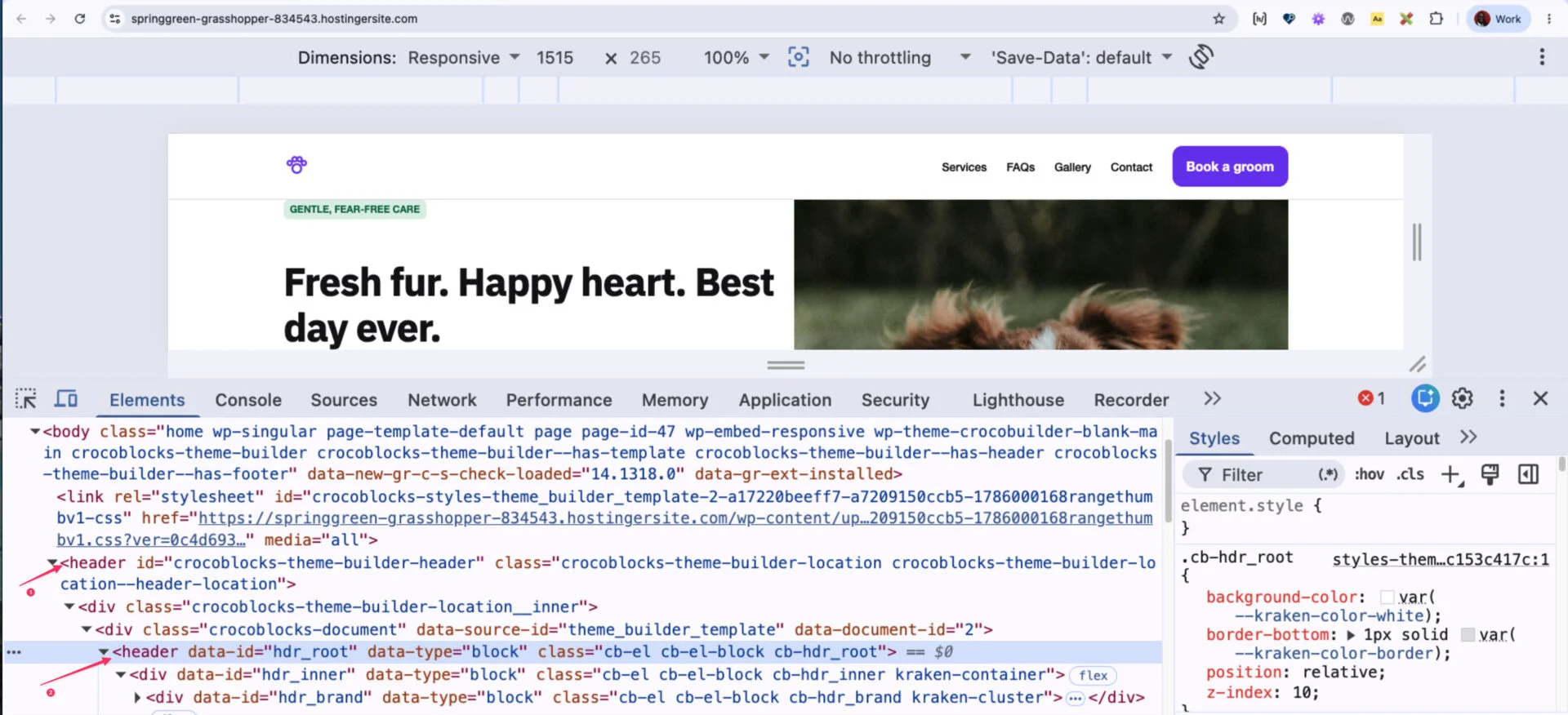
These examples are not a criticism of the people who made the demos. In fact, they are useful because they show how easily a reasonable AI-first workflow can reproduce the current contract problem.
If the renderer already provides the semantic Header and Footer wrappers, the schema, examples, AI guidance and validator should steer every author — human or AI — towards neutral template roots. Accessibility should be the safe default, not specialist knowledge added after generation.
8. GitHub versioning needs hard safety guarantees
GitHub versioning produced three P1 findings.
First, when the GitHub App was already installed for another site, connecting this site sent the user to global repository-access settings and never returned to the initiating CrocoBuilder flow. The site remained disconnected. This blocks a normal multi-site agency scenario.
Second, repository initialisation was not atomic, or all-or-nothing. The manifest was committed before the rest of the builder data.
When the connection service, or broker, became unavailable between those stages, GitHub retained a manifest-only repository while CrocoBuilder retained no selected repository. The repository was no longer empty enough to restart, but the product had no connection state from which to resume or disconnect.
Third, and most seriously, I placed the site in GitHub-first mode specifically to isolate changes in a separate working copy, known as a worktree. The live status reported GitHub mutations disabled and identified production as the effective target. A design-system mutation nevertheless returned success and changed the production database while the GitHub worktree remained clean.
The test value was immediately removed, and production returned to its starting state. Even so, this is exactly the boundary version control is meant to protect. GitHub-first must either write only to the selected worktree or reject the mutation. It must never fall back silently to production.
The public product page still marks GitHub versioning as coming soon, and these findings explain why it should remain clearly labelled experimental until those guarantees are in place.
CrocoBuilder Blank needs a clearer semantic contract
The Blank theme is minimal, which is appropriate for a builder. Minimal does not have to mean semantically ambiguous.
In the supported native, current-page workflow, ordinary Page content remains in the WordPress page document. If that builder document includes the correct <main> landmark, CrocoBuilder Blank 1.0.0 wraps it in a hard-coded <article>. HTML does not allow <main> inside <article>, so this produces an invalid article > main relationship.
The opposite problem appeared when native archive and individual-content pages fell back to the theme: those routes had no dependable main-content landmark or shared #content target.
Theme Builder Header and Footer output also provides semantic wrappers, while the supplied authoring example encouraged templates to add another <header> and <footer> inside them. The validator accepted the nested landmarks as clean.
I fixed the test site with a small child theme that owns exactly one main#content in Page, singular, archive/search and 404 templates. I then changed the outermost elements of the affected builder pages to neutral div elements.
A follow-up check across nine routes found one main landmark, no article > main, no nested main elements and a working skip target on every tested route.
That workaround is update-safe, but the parent theme should make it unnecessary. The cleanest product contract would be:
- The Blank theme owns one consistent, focusable
main#contenton every native template path. - Builder page documents use neutral outer elements when rendered inside that shell.
- Theme Builder Header and Footer templates use neutral roots because the renderer owns their landmarks.
- Validation becomes context-aware enough to flag duplicate or invalid landmark patterns.
The complete findings snapshot
The table below groups the confirmed CrocoBuilder and contract findings without reproducing every technical step from the underlying bug reports.
| Area | Severity | Finding IDs | What happened |
|---|---|---|---|
| Theme Builder | P1 | CB-002 | Saved CPT archive and single body assignments did not resolve publicly. |
| GitHub versioning | P1 | CB-019, CB-020, CB-021 | Existing-App multi-site connection failed; initialisation could strand a partial repository; GitHub-first MCP writes could silently target production. |
| Admin accessibility | P2 | CB-001 | Options navigation, semantics, labels, landmarks and narrow-screen reflow were unreliable. |
| Design-system states | P2/P3 | CB-003, CB-004, CB-018 | :focus-visible was discarded; text variables were typed as colours; valid custom selectors were rejected with misleading messages. |
| Frontend navigation | P2/P3 | CB-005, CB-010, CB-011 | Menu close did not restore focus; the mobile drawer flashed during initialisation/breakpoint changes; overlay visibility used redundant state. |
| Preview and rendering trust | P2 | CB-006, CB-008 | Preview template matching returned false negatives; saved local styles could fail to render despite successful mutation and readback. |
| Frontend accessibility and Blank theme | P2 | CB-007, CB-009 | No native skip target; builder-owned main content was wrapped inside an article by the Blank theme. |
| Visual editor accessibility | P2 | CB-012 | All 32 Dev palette cards were unavailable to keyboard-only users. |
| Code-first state and persistence | P2/P3 | CB-013, CB-014 | A blocked mode switch showed contradictory state; accepted hidden and inert attributes were silently dropped. |
| Component validation | P3 | CB-015 | Components inserted by the product UI triggered the product validator’s property-shape warning. |
| Raw CSS | P2 | CB-016, CB-017 | CSS nesting was flattened; keyframes and registered custom properties were corrupted without diagnostics. |
| Component contract | P2 | DOC-001 | Shipped property guidance and identifier normalisation disagreed with the live validator and saved template. |
| Theme Builder contract | P2 | DOC-002 | Examples and validation encouraged nested Header and Footer landmarks. |
Separately, the rendered-output audit found partly unused element metadata, one Theme Builder inner wrapper with no proven public role, an empty Header stylesheet, and document CSS links emitted in the body. These remain unclassified architecture/optimisation findings and are not included in the severity totals above.
There were also two Novamira integration findings. One involved bearer-token routing; the other involved unavailable design abilities referenced by a Novamira skill. The bearer-token issue has already been reported to the Novamira team. The design abilities are not required here because Novamira does not officially support CrocoBuilder yet.
What I would improve before calling the experience production-ready
1. Make saved and routed state the single source of truth
After every save, the interface should show the actual saved result. Unsupported values should be rejected before anything changes. A success response should mean the expected revision changed, the compiled output includes the change and the selected target actually received it.
This one principle would address the most worrying pattern across Code-first attributes, local styles, Raw CSS, preview signals and GitHub-first routing.
2. Fix the four P1 workflows before adding more features
Custom post type (CPT) template matching and the three GitHub findings affect the workflows the product is explicitly designed to unlock. Stabilising those is more valuable than adding another impressive demo feature.
3. Bring visual and code workflows up to the AI workflow’s standard
Every visual action needs a keyboard equivalent and clear failure feedback. Code-first needs a published list of supported markup, accurate diagnostics and lossless handling of everything it accepts. The visual and code editors should feel like two views of one document, not two loosely synchronised tools.
4. Define exactly which CSS the Raw CSS editor supports
Supported syntax should remain unchanged after saving and reopening wherever practical. Unsupported structural syntax should produce specific, pre-save errors. Adding linting and a generated-CSS preview would turn a risky black box into a developer feature.
5. Reduce front-end wrapper overhead and load styles earlier
Keep the stable hooks that compiled styles and interactive widgets actually need, but omit unused generated metadata where the renderer can prove it is unnecessary.
Remove or flatten the Theme Builder location-inner wrapper unless it has a documented responsibility. Resolve applicable document assets early, enqueue them in the head with explicit dependencies, and do not output empty stylesheets.
6. Ship an accessible baseline in both plugin and theme
Keyboard-operable palette controls, focus restoration, visible focus, skip navigation, stable content targets and valid landmarks should work before a site author adds custom accessibility code. These are foundations, not finishing touches.
7. Make documentation context-aware
The MCP contract is powerful, but examples must agree with the live validator and renderer. Header/Footer examples should disclose renderer-owned landmarks. Component property types and normalised identifiers should match the saved contract. The AI-agent setup screen should explain tokens, headers, client differences and verification in task-oriented language.
8. Treat GitHub operations as transactions
Initialisation should be all-or-nothing or resumable. The product should record enough state to recover from a broker failure without asking a user to delete a repository. Every status screen and mutation response should name the real target, branch and resulting revision. Production fallback should be impossible in GitHub-first mode.
9. Publish a beta compatibility and known-issues matrix
A concise list of supported code-first tags and attributes, Raw CSS features, Theme Builder condition types, integration versions and experimental versioning limitations would help early adopters test responsibly. Clear limits create more trust than silent normalisation.
Who should try CrocoBuilder now?
CrocoBuilder is already worth exploring if you are a developer or agency comfortable testing on staging, especially if you work with dynamic WordPress data, design systems, reusable components or AI agents. Teams already familiar with JetEngine will recognise the value of connecting structured content to a cleaner front-end model.
I would be more cautious if your immediate requirement is a highly polished no-code handoff, complete keyboard accessibility, advanced hand-authored CSS inside the builder, or production-critical GitHub-first isolation. Those are precisely the areas that need the next round of work.
I would also retest the exact CPT Theme Builder and Blank-theme behaviours before using this beta as the foundation of a client launch. Beta.20 is a point-in-time result, not a permanent claim about later releases.
If you want to compare notes, Builderius is taking a similar direction on WordPress: a visual editor, a code panel and its own Sense AI assistant working from one shared document. For site owners already using it, the Daveden Builderius Enhancements (DBE) plugin adds more features.
For a look at how a more established builder is handling its own AI-era update, see my review of Editor v4: The future of Elementor in 2025 and beyond.
A positive conclusion
There is a lot here worth rooting for.
CrocoBuilder’s best idea is not that AI can build a WordPress page. Plenty of tools can produce a convincing first draft. Its best idea is that the AI draft, the visual editor, the design system, the dynamic data and the developer’s code should all describe the same maintainable site.
The beta proves that much of that architecture is real. I built native pages, reused components, rendered live JetEngine content, applied responsive global classes, validated documents and moved scoped changes through a GitHub-backed workflow. Those are substantial wins.
The beta also shows where the product must become more disciplined. A developer-grade builder earns trust when nothing is silently dropped, rewritten, misreported or routed somewhere unexpected.
A visual builder earns trust when every user can operate it, and every visible state matches reality. A Blank theme earns trust by providing a safe semantic shell without requiring a child-theme patch.
So my conclusion is positive, with conditions: CrocoBuilder has a genuinely compelling foundation and one of the stronger AI-native WordPress architectures I have tested, but the manual visual, code-first, accessibility and versioning paths need to catch up with the ambition.
If Crocoblock focuses the next releases on those trust boundaries rather than only on the most dramatic AI demos, CrocoBuilder could become something more useful than another AI page builder. It could become a front-end system that teams can prompt, inspect, edit, version and maintain with confidence.
That is the version of CrocoBuilder I would like to see reach 1.0.
Testing note: this article reflects CrocoBuilder 1.0.0-beta.20 and CrocoBuilder Blank 1.0.0 in a controlled local WordPress environment on 9 August 2026. The two public demo pages were also inspected on that date. Later builds or page edits may change or fix the behaviours described above.
Comments
No comments yet — be the first.
Leave a comment
Replying to .
Thanks — your comment is in
It's awaiting moderation and will appear after it's approved and the site is rebuilt.